The Account Trust Log is a cryptographic record of trust in a 1Password account that allows services like Automated Provisioning to verify the authenticity of public keys used to share sensitive data, without needing to trust 1Password’s servers. The log allows clients to verify a public key before carrying out operations with that key. Even if 1Password’s infrastructure were compromised or behaving maliciously, attackers couldn’t insert themselves into a key exchange without your knowledge.
After the Trust Log is turned on, it runs in the background. Unless malicious activity is detected, no user action is required to stay protected.
Design principles
The Account Trust Log system is designed around these core principles:
- Zero server trust: Once configured, clients no longer need to rely on the server for genuine public keys.
- Immutable: Data written to the Trust Log can’t be removed or modified by anyone, including 1Password.
- Transparent and auditable: The log is verifiable from the beginning and provides a permanent audit trail of account activity.
- Privacy-preserving: No private data is stored in the Trust Log.
- Foundational: You can rely on the Trust Log for the newest 1Password features. The Trust Log cannot be turned off once it’s enabled, so it acts as a permanent security upgrade to an account.
Trust principles
The Trust Log is a cryptographically linked series of entries which form a tamper-evident chain describing which keys are trusted in an account over its lifetime. Events that add a trusted public key, such as adding a user or group, are recorded as entries. Verification is distributed across 1Password clients and coordinated by 1Password’s servers, so there’s no single arbiter of truth that could be compromised alone.
Every entry is signed by a trusted key in the log’s context, so only authorized actors can change account state. When an admin confirms a new user, they sign an entry with a signing key they own. That entry is trusted only if the admin was added to the log earlier and not later removed. Changes to the Trust Log therefore come from within the account, with trust rooted in the first owner who created the account.
The Trust Log provides cryptographic attribution for sensitive security events. Unlike standard audit logs, every Trust Log entry is signed with the user’s private key, which is encrypted and protected by their Account Unlock Key. This makes sure that actions are permanently and verifiably linked to the specific individual, because only they can access the private key required to sign an entry.
Trust on first use
The Trust Log follows a “Trust on first use” model. When the Trust Log is enabled, you initially trust that existing account data is correct. After that, you no longer need to trust the server for key authenticity. Clients keep some local state about the Trust Log so they can detect if the server suddenly pretends the Trust Log isn’t turned on, attempts to alter an entry that’s already been validated, or provides data not signed by another admin in the account.
World State
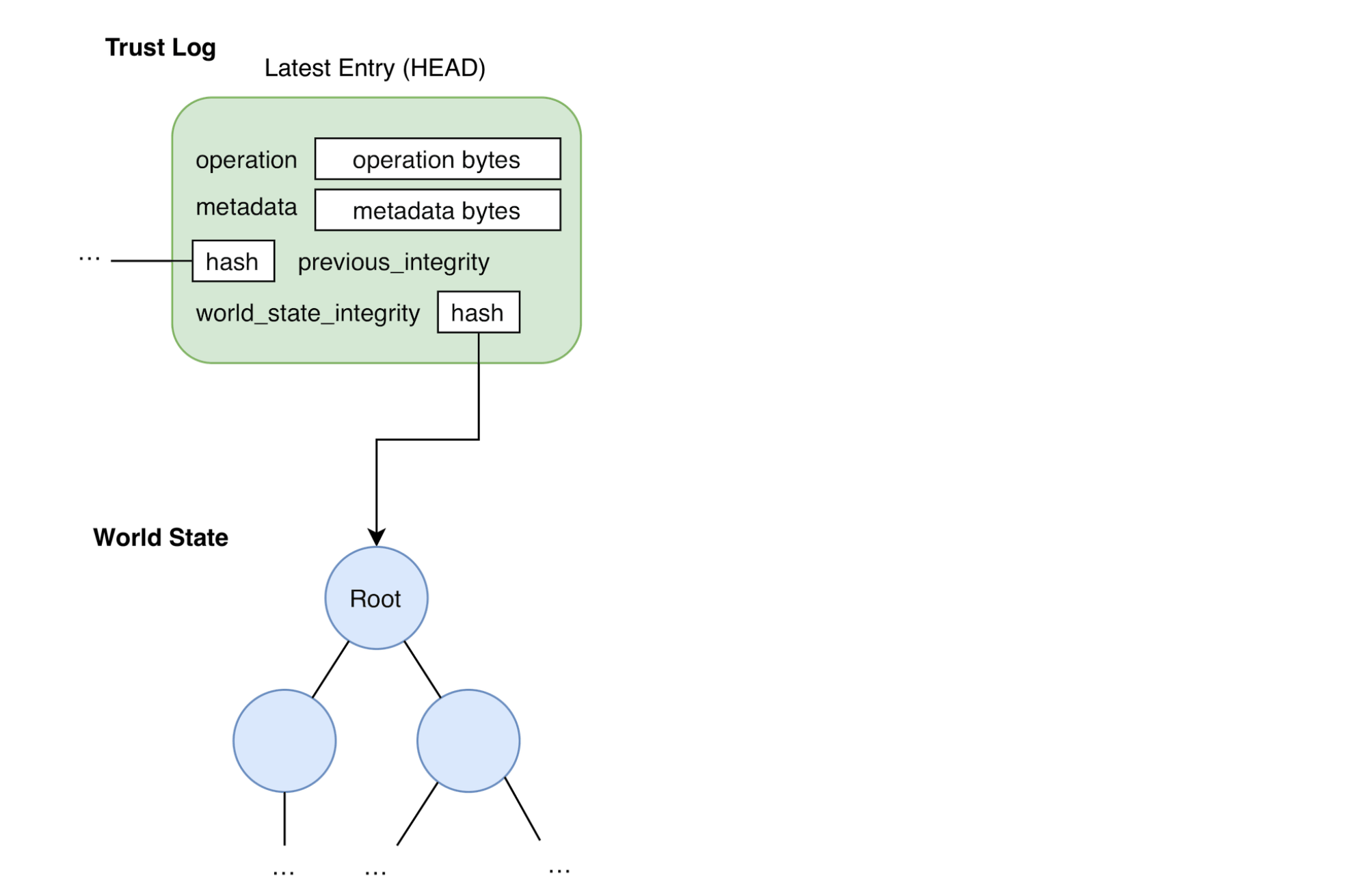
Alongside the Trust Log, the system defines a World State. This is another tamper-evident structure that clients use to look up trusted data for sensitive operations (for example, encrypting a shared secret). The World State is derived from Trust Log history up to a point in time, so there’s one World State per trust log entry.
The Trust Log records how the account changes over time, while the World State is a snapshot of all trusted data at a moment in time. Each entry stores its World State’s integrity value, so the two structures stay tightly coupled.
The following are some important properties of the World State:
- A complete Trust Log can always be replayed, entry by entry, to reconstruct a World State.
- The World State has a canonical form: Each Trust Log entry corresponds to exactly one World State.
The World State is implemented as a Modified Patricia-Merkle Trie (MPT) , which is a type of radix trie. MPTs fit this use case because they’re efficient to store and query, while also being deterministic, verifiable, and flexible in what they store.
Appending to the Trust Log
An easy way to understand the Trust Log as a verifiable chain is to see how a new entry is built and appended.
Entry structure
Each Trust Log entry includes the following:
- Operation: The change the entry makes to the World State.
- Entry integrity: A hash of the previous entry in the chain.
- Signature: Authentication of who created the entry.
- Metadata: Extra context about the entry.
Because each new entry includes the previous entry’s hash, clients can verify the full history. Changing any entry invalidates the integrity of every later entry, so tampering is detectable.
Appending a new entry
Appending starts from the latest Trust Log entry (HEAD) and its World State:
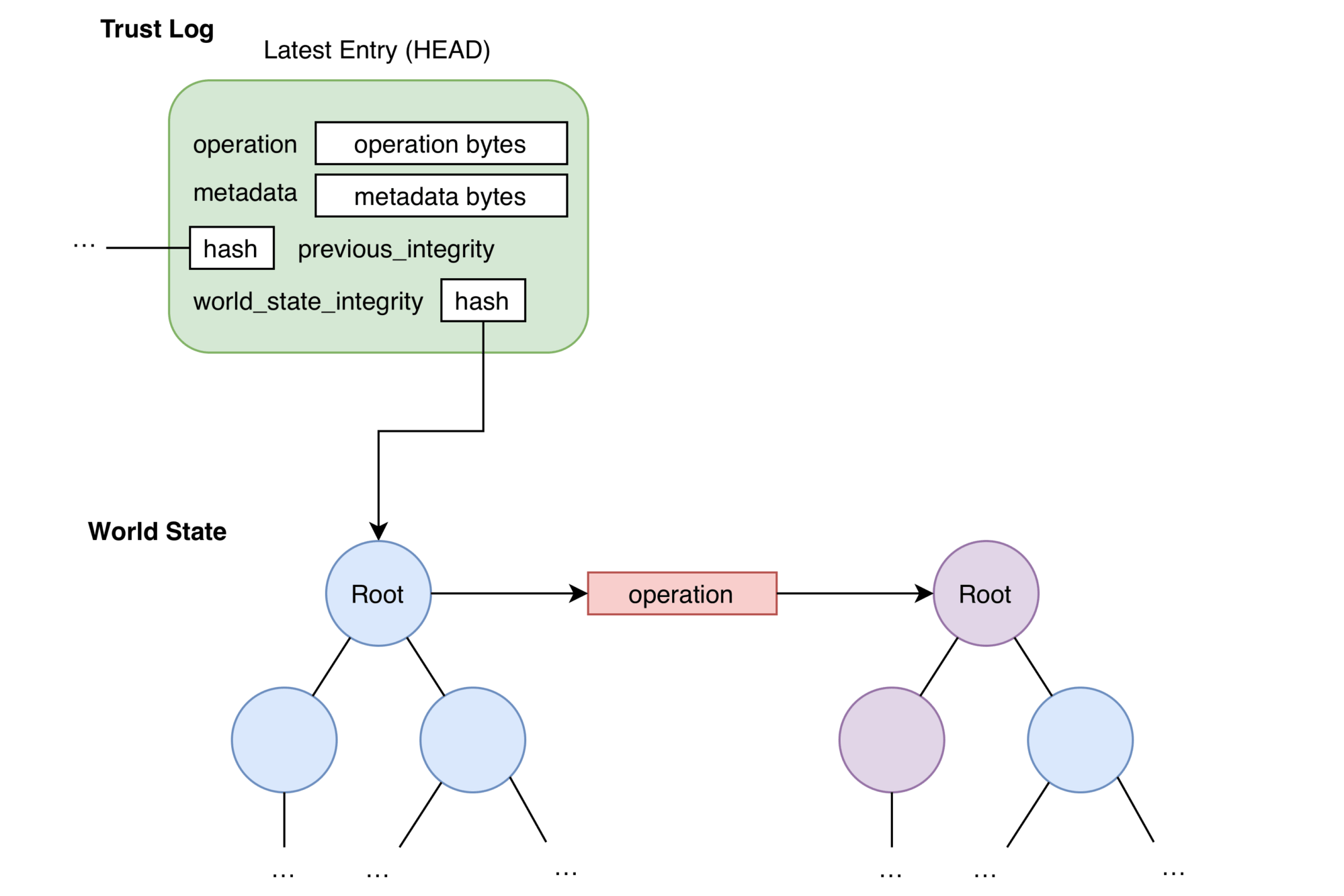
A new Operation is built from the action being performed. The rules for how an Operation updates the World State are precise and shared by all clients. Applying the Operation to the current World State yields the new World State and its integrity value:
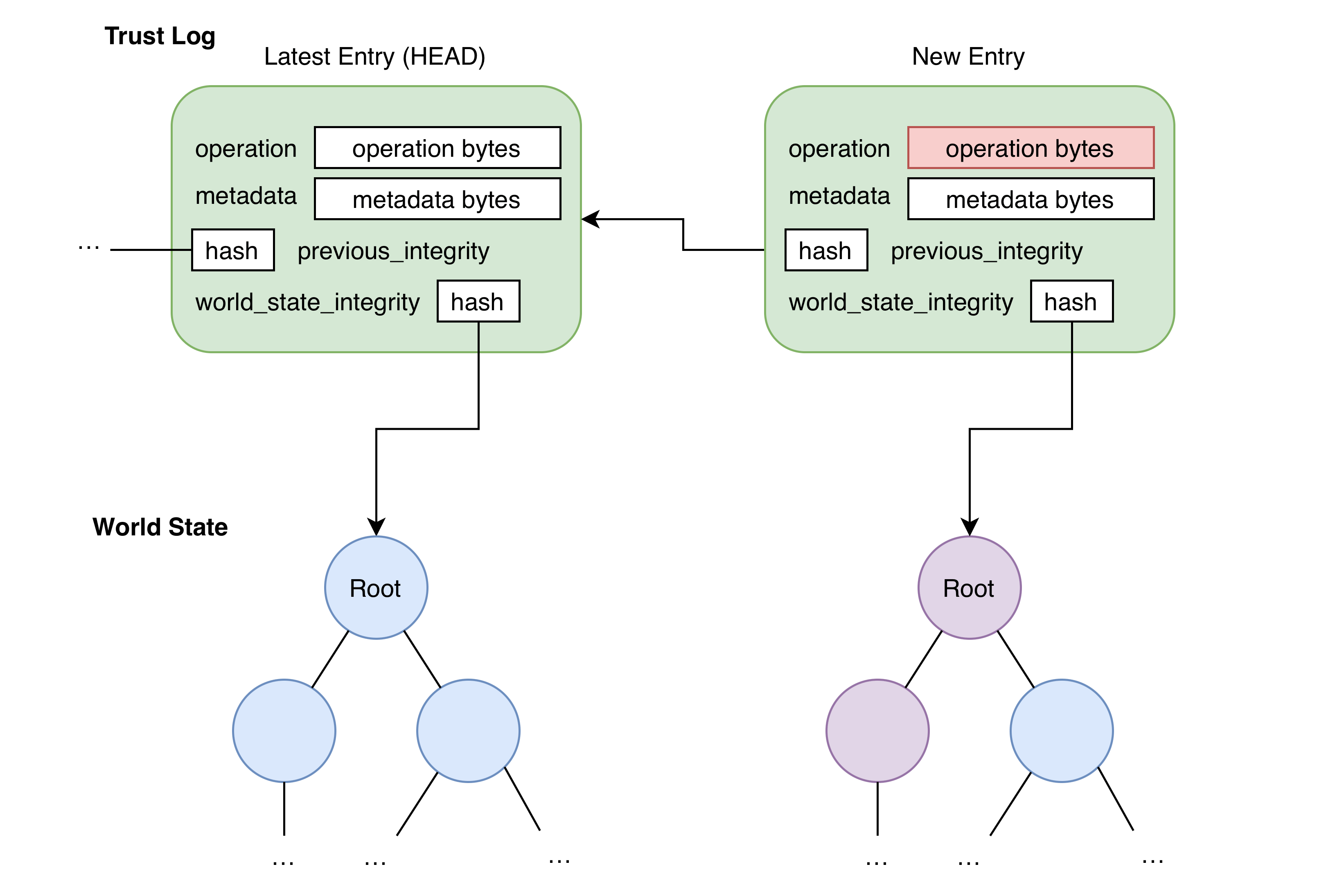
Using the new World State integrity, the HEAD’s integrity, and other metadata, the new entry is assembled. The inclusion of the HEAD entry’s integrity makes sure that the new entry forms a new link in the chain of the Trust Log. The contents of the new entry will be used by clients to make sure the entry was a valid operation at the time it was created and hasn’t been tampered with since.
The new entry is serialized, signed, and sent to the server to append to the account’s Trust Log and distribute to everyone on the account:
Client verification
As the Trust Log grows, each client must track the account’s current trusted state. Updating local state to match the latest shared log is called fast-forwarding.
Fast-forwarding verifies each new entry in order. Besides basic structure checks, clients must make sure:
- The entry’s signature is valid and belongs to a key present in the World State.
- The entry contains a valid reference to the integrity value of the previous entry in the log.
- The entry number is exactly one greater than the previous entry’s number.
Only after every entry passes these checks can the client trust the account state described by the latest World State.
The server has two primary functions:
- Data consistency: It makes sure that all submitters are up to date and new entries append to a single, sequential, shared chain (one Trust Log per account).
- Governance: It enforces existing access control mechanisms, which makes sure that only users with the correct permissions within the account can append corresponding operations to the Trust Log.
Syncing and bookmarks
On multiple devices, users can avoid re-verifying Trust Log segments they’ve already checked by using a Bookmark.
A Bookmark records how far into the Trust Log a user has verified. Because the log is append-only, verified history doesn’t need to be re-checked. Bookmarks are a safe starting point when fast-forwarding: You trust the log up to that point because you’ve already verified earlier entries.
Bookmarks are signed with a key derived from the user’s symmetric key, so they stay authentic even when stored somewhere untrusted (for example, on the server). One client can upload a Bookmark, then another can fetch and verify it with the same user symmetric key.
To maintain trust on first use, clients also store a Bookmark locally so the server can’t falsely claim there’s no Trust Log. When someone joins an account or sees the Trust Log for the first time (for example, first sign-in after enablement), they have no Bookmark yet and must implicitly trust the server’s claim about the latest entry to create their first Bookmark. After that, they can detect later server tampering.
Server entries
The Trust Log is meant to limit server interference, but some features require the server to change account state without a user signing an entry (for example, the account policy to automatically delete suspended users). The server must be able to remove users from the account, and thus the Trust Log, without full freedom to rewrite World State arbitrarily.
For scenarios like this, the system defines server Trust Log entries and a small, fixed set of server Operations the service may apply at any time. Those Operations never add new non-server key material. A malicious or mistaken server entry would be visible in the log and would at worst disrupt service, not undermine the Trust Log’s goal of guaranteeing the authenticity of public keys used to share sensitive data without needing to trust 1Password’s servers.
The Trust Log in automated provisioning
The Trust Log is part of what makes automated provisioning in 1Password possible. Any provisioning flow can grant access to secrets. In 1Password, access is granted by encrypting secrets with the public key of the user or group that needs access. The key used in that encryption must belong to the intended recipient, or the secret could be compromised.
Together with the confidential computing platform, the Trust Log lets the enclave that manages provisioned access to groups and shared vaults authenticate the public keys it grants access to. Neither 1Password, nor someone with infrastructure access, can trick the service into granting access to a key that isn’t part of the account.
Mehr erfahren
- About the security of 1Password confidential computing
- Über das 1Password-Sicherheitsmodell
- 1Password Sicherheitsdesign-Whitepaper
- Best Practices zur Sicherung deines 1Password Business-Kontos
War dieser Artikel hilfreich?
Freut mich, das zu hören! Wenn du etwas hinzufügen möchtest, zögere nicht, uns zu kontaktieren.
Tut mir leid, das zu hören. Bitte kontaktiere uns, wenn du uns mehr darüber erzählen möchtest.